Credit card reward programs can get pretty complicated.
It’s easy to under how you earn the points, but how do you spend them?
You don’t want to spend them the wrong way and leave money on the table.
When we got the Amazon.com credit card, I was happy to earn 5% on my purchases at Amazon but I wasn’t entirely sure how to spend the points. What was the best way?
Fortunately, Amazon and Chase have made it very simple once you understand the program.
So, what is the best way to use these Amazon credit card points?
Table of Contents
Ways to Use Amazon.com Credit Card Points
The Amazon.com credit card has a few options but they’re all valued at 1 penny per point.
You can use them:
- for purchases at Amazon.com – 1 penny per point
- for Travel – 1 penny per point
- for Cash Back – 1 penny per point
- for Gift Cards – 1 penny per point
Unfortunately for your rewards (but fortunately for your sanity and memory), everything is 1 cent per point.
💸 Cash Back is the Best Way
Right now, given how all the redemption methods value the points at 1 penny per point, cash back is the best option.
Shopping on Amazon.com with your points may sound great but when you pay with points, you aren’t earning 5% point on those purchases.
If you are carrying a balance on your card, you may be tempted to use the points on purchases to keep your balance low… but you are still better off getting the cash, paying down your balance, and then making those purchases with your Amazon.com card because you’re earning 5%.
Gift cards and other redemption methods will also be sub-optimal because you can always make those purchases on the card and be earning points in the process.
Getting cash back is super simple… just log into your account, click on the “Earn/Use” drop down at the top (where it shows your point total), and select Cash Back at the top:
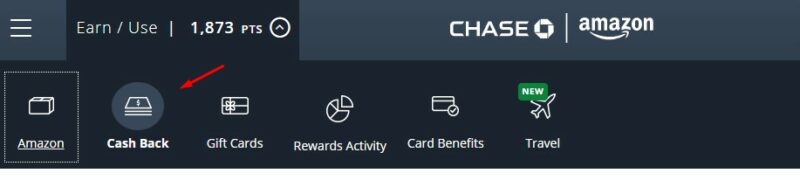
Then you can transfer the points into cash directly into your linked account. You can redeem for a statement credit too if you want to skip a step, it won’t affect your rewards benefit but it also will not count towards your minimum payment that month.
Until Chase and Amazon change the redemption values, or add transfer partners that make it a better deal, cash back is king with the Amazon.com card.
Not All Rewards Are Like This
You might think that cash back is the best for all credit cards but that isn’t the case.
There are many programs that offer a higher valuation on a point when you spend it on other things. For example, there are programs where you can get a higher value per point when you use those points on the card’s travel portal – Chase Ultimate Rewards is a good example of this.
Sometimes you can get better value if you transfer the points to a transfer partner, as is the case with some airlines. You have to know the airlines involved and have a use for the points, which will affect the value of those points to you personally, but it offers a potential for higher values.
But for the Amazon card, until something changes, cash back is king.
The post Best Way to Use Amazon.com Credit Card Points appeared first on Best Wallet Hacks.
from Best Wallet Hacks https://ift.tt/Lc8HkjG
Comments
Post a Comment
We will appreciate it, if you leave a comment.