We all know that shopping around is the best way to save money on any subscription.
But who has the time to shop around all the time? I know I don't.
We can also play the “cancel game,” where you call up a company and threaten to cancel. They play their role of saying “OK OK, don't cancel, let me give you an incentive to stay.”
But that takes time and who wants to do that all the time?
Today, we have a hack that can save you $10 a month on every active phone line for the next 12 months. That's a minimum $120 for a few minutes of tapping on your phone.
There is no guarantee that Verizon will offer you a discount if you take these steps. But the steps take just a few minutes so your ROI, if it works, is amazing.
How to Save $10 per Month per Phone Line
The best part about this process is that you don't have to wait on hold, you don't have to talk to anyone, and you don't have to pretend you're canceling your line… you can do it all in the app.
- Open up your My Verizon app and tap on the Account tab in the bottom navigation menu
- Scroll down to your Devices and tap on one of your devices
- Scroll down to Device Management, tap Number Lock and unlock your numbers (if they are locked)
- Then tap Number Transfer Pin and request a PIN
- Then wait.
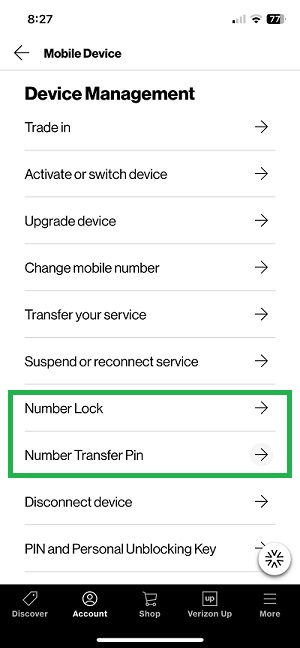
What you've effectively done is ask Verizon for permission to port your phones to another carrier.
And they will do what most companies do, offer you an incentive to save:

And an hour later, I got this text message:
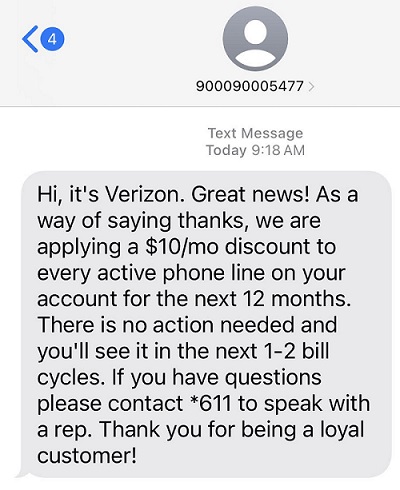
The text in case you can't read it:
Hi, it's Verizon. Great news! As a way of saying thanks, we are applying a $10/mo discount to every active phone line on your account for the next 12 months. There is no action needed and you'll see it in the next 1-2 bill cycles. If you have questions please contact *611 to speak with a rep. Thank you for being a loyal customer!
If you have Number Lock activated, you must turn it off for this to work. We recommend Number Lock as part of our DIY identity theft guide because it prevents someone from porting your phone without your permission.
When I did this last night, I forgot I had Number Lock activated and just asked for a PIN. With just the PIN and Number Lock still ON, it didn't trigger the discount email.
This morning, I realized we still had Number Lock on so I turned it off all of our devices. It triggered this discount email within just a few minutes.
I suspect you can request the PIN and turn off Number Lock in any order, as long as both are satisfied then you will see the email.
Good luck getting the discount!
 Oh! Remember to turn on Number Lock after you're done!
The post Verizon Wireless Hack: How to Save $10/mo On Every Phone Line appeared first on Best Wallet Hacks.
from Best Wallet Hacks https://ift.tt/2ivgoqU
Comments
Post a Comment
We will appreciate it, if you leave a comment.